




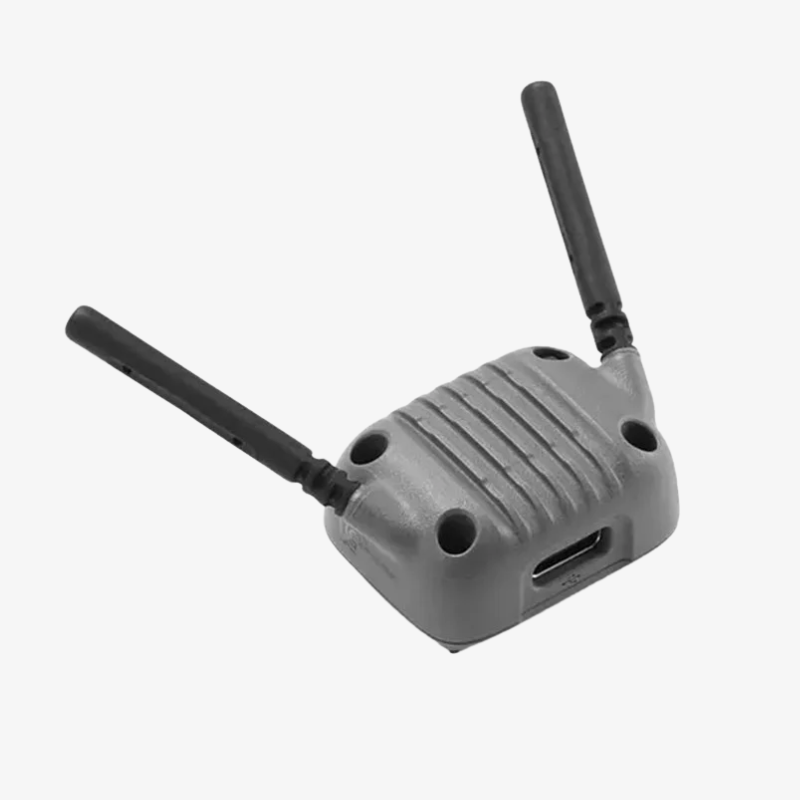
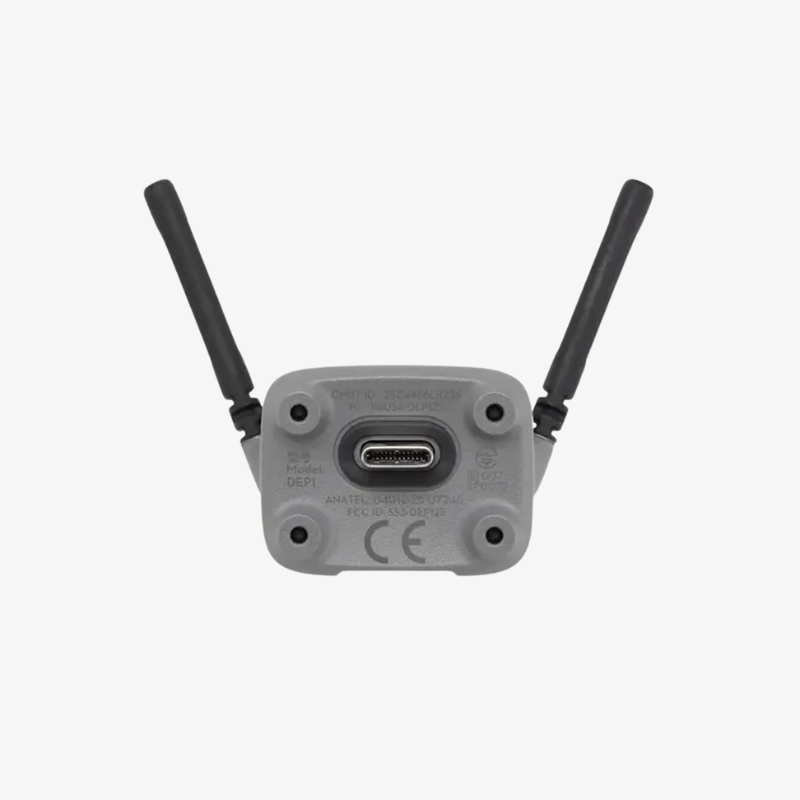
DJI Neo 2 Digital Transceiver
₹9,999.00 Original price was: ₹9,999.00.₹7,999.00Current price is: ₹7,999.00. incl. Gst
• Product Name: DJI Neo 2 Digital Transceiver
• Compatibility: Works with the DJI Neo 2 drone system
• Function: Provides stable digital transmission and control
• Transmission Type: 2.4 GHz digital signal
• Range: Up to 2 km (open area)
• Latency: Low-latency real-time communication
• Antenna: Built-in high-gain antenna
• Power Input: USB-C
• Safety: Anti-interference and signal protection
• Build Quality: Lightweight and durable
• Use Case: Reliable link for flight control and data transmission

Need Help? Chat with an Expert
- 9891098328
Free Shipping & Returns
Assured Quality
Online Support 24/7
Secure Payment
- Description
- Specification
- Reviews (0)
Description
DJI Neo 2 Digital Transceiver
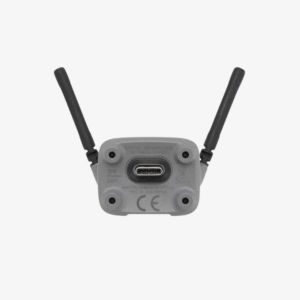
DJI Neo 2 Digital Transceiver is a compact yet powerful communication module designed to unlock the full potential of your Neo 2 drone. Without this module, the drone operates only in short-range smartphone Wi-Fi mode, but once the transceiver is attached, the drone transforms into a long-range, professional-grade flying system. It enables HD video transmission, stable long-distance control, compatibility with remote controllers and FPV goggles, and the kind of smooth responsiveness that makes flying feel far more advanced. Its lightweight form, easy installation, and highly optimised signal performance make it a mandatory upgrade for serious pilots.
Key Features
1. Extended Transmission Range
The transceiver activates the O4 digital transmission system, giving the Neo 2 a far greater range than standard Wi-Fi mode. In ideal open conditions, the flight range increases dramatically, allowing you to fly confidently without worrying about weak or unstable signal drops during longer routes.
2. Ultra-Stable HD Video Feed
With the transceiver installed, the drone sends a smooth HD video feed to your controller or goggles with very low latency. This ensures fast response while flying, making it perfect for precise manoeuvres, action shots, and immersive viewing through FPV goggles.
3. Plug-and-Play Installation
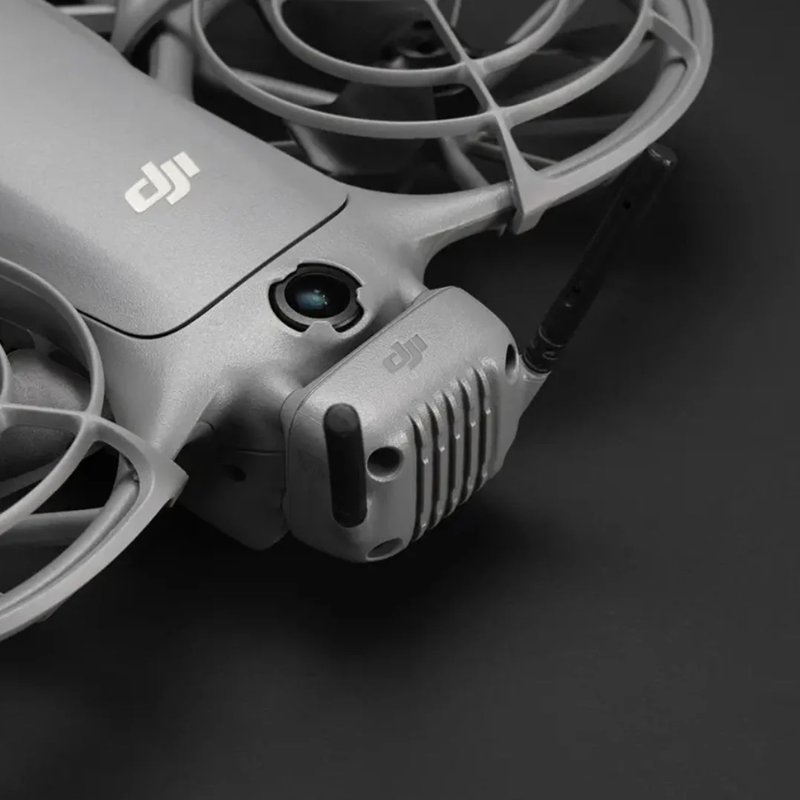
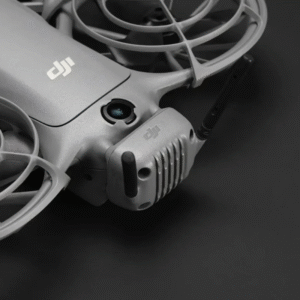
The module is straightforward to install. It simply attaches to the dedicated mount on the drone and connects directly without any complex setup. Its compact 9-gram body and optimised shape fit perfectly into the aircraft without disturbing balance or aerodynamics.
4. Works With Controllers & Goggles
Once attached, the drone becomes compatible with multiple controllers, motion controllers, and FPV goggles. This flexibility allows you to choose your preferred flying style — whether regular remote flying, FPV immersive flying, or cinematic controlled flight.
5. Intelligent Signal Adaptation
The transceiver automatically adjusts its signal band and power based on the environment. Whether you’re in open fields, suburban areas, or semi-interference zones, the module balances transmission to maintain the most stable connection possible.
6. Lightweight Construction
Built with minimal weight in mind, the transceiver adds only a tiny load to the drone. This ensures flight performance remains unchanged while giving you the advantages of long-distance control and HD video feedback.
7. Unlocks Full Drone Capabilities
Without this module, the Neo 2 operates in only short-range smartphone-controlled mode. With the transceiver, features like long-range flying, FPV goggles, remote controllers, higher-quality live feed, and professional-grade control become fully available.
8. Durable & Travel-Ready
Encased in a compact and sturdy body, the transceiver is designed to handle regular outdoor use. It withstands minor bumps, heat variations, and long flying sessions, making it a reliable companion for everyday or adventure flying.
9. Dual-Band Transmission
The module supports dual-band frequencies (such as 2.4 GHz and 5 GHz, depending on region), giving more stability and flexibility. This ensures smoother signals in changing environments and reduces the chance of interference.
10. Flexible Usage Option
A great advantage is that you only need to attach the transceiver when you require long-range or FPV flying. For short-range casual flights, you can fly without it, making it a highly versatile accessory.
How to Use
-
Power off the drone before inserting or removing the module.
-
Attach the transceiver to the designated slot and ensure it clicks or sits correctly.
-
Power on the drone and then your controller or goggles to allow automatic connection.
-
Confirm video feed and signal strength before takeoff.
-
After flying, power off the drone and carefully remove the transceiver if you do not plan to use long-range mode.
How to Take Care
-
Inspect the module regularly for dust inside the connector or loosened screws.
-
Avoid applying pressure on antennas or corners to prevent internal damage.
-
Never install or remove the transceiver while the drone is powered on.
-
Store it in a dry pouch or protective case when not in use.
-
Use the module only with recommended compatible devices to ensure stable performance.
Safety Tips
-
Do not fly long-range in high-interference zones or extremely crowded signal areas.
-
Make sure the antenna area is clean and undamaged before every flight.
-
Keep the drone within visual line of sight even when using extended-range mode.
-
Avoid unauthorised modifications to the module’s hardware.
-
Transport the transceiver in a protective case to prevent accidental impact.
Final Note
The DJI Neo 2 Digital Transceiver is the single most important accessory to unlock the full power of the Neo 2. It upgrades your drone from a basic short-range flyer to a long-range, professional and FPV-ready aircraft. Whether you’re exploring, capturing cinematic shots, or enjoying immersive FPV experiences, this module ensures stable control, clear video feed, and extended freedom in the air. A must-have for anyone serious about flying the Neo 2.
| Item | Specification / Detail |
|---|---|
| Compatibility | DJI Neo 2 drone |
| Transmission System | Digital video/data transmission — DJI O4 HD Video Transmission |
| Maximum Range | Up to ~ 10 km (FCC region) / ~ 6 km (CE/SRRC/MIC regions) |
| Operating Frequencies | 2.4 GHz and 5.8 GHz dual-band auto-switching |
| Latency | Ultra-low latency (optimized for FPV flight/controller or goggles use) |
| Weight (module) | Approx. 9 g |
| Dimensions (L × W × H) | 44.6 × 27 × 44.6 mm |
| Mounting / Integration | Plug-and-play module; attaches directly to the back of Neo 2 |
| Connection / Compatibility with Accessories | Works with compatible remote controllers (e.g. RC-N3, RC 2 / Motion Controller) and FPV goggles (e.g. Goggles N3 / Goggles 3) for live video + control |
| Main Function / Purpose | Provides stable, low-latency video feed and control — required for full O4 transmission performance, longer range, better signal stability vs. standard Wi-Fi |
Be the first to review “DJI Neo 2 Digital Transceiver” Cancel reply
Overview
DJI Neo 2 Digital Transceiver
DJI Neo 2 Digital Transceiver is a compact yet powerful communication module designed to unlock the full potential of your Neo 2 drone. Without this module, the drone operates only in short-range smartphone Wi-Fi mode, but once the transceiver is attached, the drone transforms into a long-range, professional-grade flying system. It enables HD video transmission, stable long-distance control, compatibility with remote controllers and FPV goggles, and the kind of smooth responsiveness that makes flying feel far more advanced. Its lightweight form, easy installation, and highly optimised signal performance make it a mandatory upgrade for serious pilots.
Key Features
1. Extended Transmission Range
The transceiver activates the O4 digital transmission system, giving the Neo 2 a far greater range than standard Wi-Fi mode. In ideal open conditions, the flight range increases dramatically, allowing you to fly confidently without worrying about weak or unstable signal drops during longer routes.
2. Ultra-Stable HD Video Feed
With the transceiver installed, the drone sends a smooth HD video feed to your controller or goggles with very low latency. This ensures fast response while flying, making it perfect for precise manoeuvres, action shots, and immersive viewing through FPV goggles.
3. Plug-and-Play Installation
The module is straightforward to install. It simply attaches to the dedicated mount on the drone and connects directly without any complex setup. Its compact 9-gram body and optimised shape fit perfectly into the aircraft without disturbing balance or aerodynamics.
4. Works With Controllers & Goggles
Once attached, the drone becomes compatible with multiple controllers, motion controllers, and FPV goggles. This flexibility allows you to choose your preferred flying style — whether regular remote flying, FPV immersive flying, or cinematic controlled flight.
5. Intelligent Signal Adaptation
The transceiver automatically adjusts its signal band and power based on the environment. Whether you’re in open fields, suburban areas, or semi-interference zones, the module balances transmission to maintain the most stable connection possible.
6. Lightweight Construction
Built with minimal weight in mind, the transceiver adds only a tiny load to the drone. This ensures flight performance remains unchanged while giving you the advantages of long-distance control and HD video feedback.
7. Unlocks Full Drone Capabilities
Without this module, the Neo 2 operates in only short-range smartphone-controlled mode. With the transceiver, features like long-range flying, FPV goggles, remote controllers, higher-quality live feed, and professional-grade control become fully available.
8. Durable & Travel-Ready
Encased in a compact and sturdy body, the transceiver is designed to handle regular outdoor use. It withstands minor bumps, heat variations, and long flying sessions, making it a reliable companion for everyday or adventure flying.
9. Dual-Band Transmission
The module supports dual-band frequencies (such as 2.4 GHz and 5 GHz, depending on region), giving more stability and flexibility. This ensures smoother signals in changing environments and reduces the chance of interference.
10. Flexible Usage Option
A great advantage is that you only need to attach the transceiver when you require long-range or FPV flying. For short-range casual flights, you can fly without it, making it a highly versatile accessory.
How to Use
-
Power off the drone before inserting or removing the module.
-
Attach the transceiver to the designated slot and ensure it clicks or sits correctly.
-
Power on the drone and then your controller or goggles to allow automatic connection.
-
Confirm video feed and signal strength before takeoff.
-
After flying, power off the drone and carefully remove the transceiver if you do not plan to use long-range mode.
How to Take Care
-
Inspect the module regularly for dust inside the connector or loosened screws.
-
Avoid applying pressure on antennas or corners to prevent internal damage.
-
Never install or remove the transceiver while the drone is powered on.
-
Store it in a dry pouch or protective case when not in use.
-
Use the module only with recommended compatible devices to ensure stable performance.
Safety Tips
-
Do not fly long-range in high-interference zones or extremely crowded signal areas.
-
Make sure the antenna area is clean and undamaged before every flight.
-
Keep the drone within visual line of sight even when using extended-range mode.
-
Avoid unauthorised modifications to the module’s hardware.
-
Transport the transceiver in a protective case to prevent accidental impact.
Final Note
The DJI Neo 2 Digital Transceiver is the single most important accessory to unlock the full power of the Neo 2. It upgrades your drone from a basic short-range flyer to a long-range, professional and FPV-ready aircraft. Whether you’re exploring, capturing cinematic shots, or enjoying immersive FPV experiences, this module ensures stable control, clear video feed, and extended freedom in the air. A must-have for anyone serious about flying the Neo 2.
Details
Reviews
There are no reviews yet.



Reviews
There are no reviews yet.